About SquareFit: No Crop Photo Fit
Post your whole photo. No cropping, no cut-off heads. SquareFit fits any photo into a square, portrait, story or any size, then fills the space with a soft blur, a color or a clean white background. WHAT YOU CAN DO . Fit...
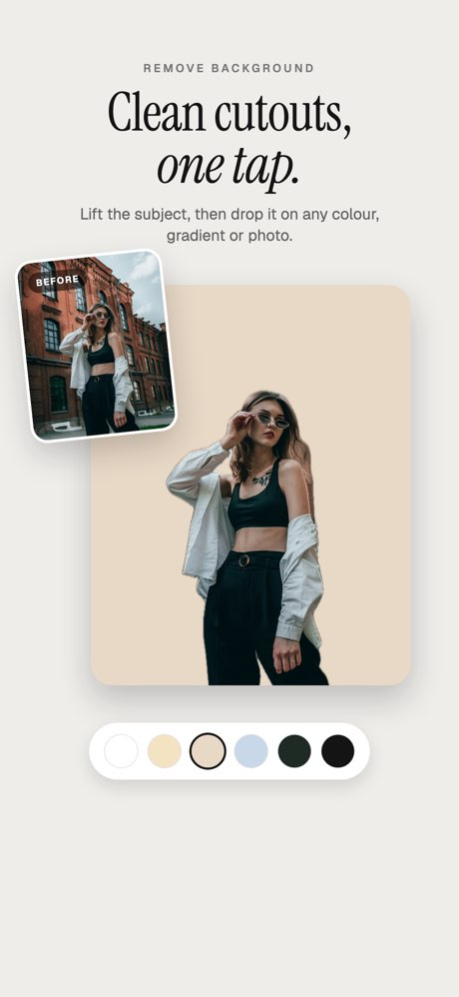
Post your whole photo. No cropping, no cut-off heads. SquareFit fits any photo into a square, portrait, story or any size, then fills the space with a soft blur, a color or a clean white background. WHAT YOU CAN DO . Fit to every size: Instagram, TikTok, Facebook, Pinterest, YouTube and more . Blur, color, gradient or white backgrounds . Add borders and frames . Remove people and objects with a tap . Remove the background in one tap . 100 ready-made templates for sales, menus, listings and events . Collages, a 3 by 3 profile grid and text on photos . Export up to 4K as JPEG, PNG or HEIF, one photo or a whole batch PRIVATE BY DESIGN Every edit happens on your iPhone or iPad. Your photos are never uploaded. SquareFit Pro unlocks every tool. Subscriptions renew automatically unless cancelled at least 24 hours before the period ends. Manage or cancel anytime in your Apple account settings. Terms of Use: https://viorastudio.com/terms Privacy Policy: https://viorastudio.com/privacy Support: squarefit@viorastudio.com
Version History SquareFit 27 is our biggest update yet. • All-new design, now made for iPad too • 100 templates for sales, menus, listings, fashion and events • Remove people and objects with a tap, now sharper • Collages, a 3 by 3 profile grid and text with new fonts • Crop, straighten, curves and filters • Batch export many photos at once • New export screen: save, share or open Photos in one step • Your work autosaves, so you can pick up where you left off 27.0 3d ago Editing feels better than ever — smoother drag, pinch, and rotate for precise control. 26.2 Apr 30 Your edits just got better. The eraser produces cleaner results with less effort, new background options give you more ways to style your shots, and a refreshed UI makes the whole app faster to use. Update and see the difference. 26.1 Mar 14 Two new editors in this update. The object remover uses AI — just tap what you want gone and it vanishes cleanly. The photo eraser is manual — draw over anything with your finger to erase it yourself. Different tools for different moments, and they don't get in each other's way. 26.0 Mar 4 Bug fixes and improvements 1.5 Feb 6 This update brings platform-perfect sizing, clean background removal, realistic shadows, and new background styling options — plus bug fixes & performance improvements. 1.3 Feb 3 • Choose Gradient Colors for your background. • Bug Fixes • Performance Improvements. 1.2 09/20/2020 iPad Support Added 1.1 09/07/2020 1.0 09/03/2020
Previous Versions
Here you can find the changelog of SquareFit: No Crop Photo Fit since it was posted on our website on 2021-12-23 19:18:01.
The latest version is 27.0 and it was updated on 2026-10-07 06:25:46. See below the changes in each version.
SquareFit: No Crop Photo Fit version 27.0
Updated At: 2026-10-06
Changes: Version History SquareFit 27 is our biggest update yet.
• All-new design, now made for iPad too
• 100 templates for sales, menus, listings, fashion and events
• Remove people and objects with a tap, now sharper
• Collages, a 3 by 3 profile grid and text with new fonts
• Crop, straighten, curves and filters
• Batch export many photos at once
• New export screen: save, share or open Photos in one step
• Your work autosaves, so you can pick up where you left off 27.0 3d ago Editing feels better than ever — smoother drag, pinch, and rotate for precise control. 26.2 Apr 30 Your edits just got better. The eraser produces cleaner results with less effort, new background options give you more ways to style your shots, and a refreshed UI makes the whole app faster to use. Update and see the difference. 26.1 Mar 14 Two new editors in this update. The object remover uses AI — just tap what you want gone and it vanishes cleanly. The photo eraser is manual — draw over anything with your finger to erase it yourself. Different tools for different moments, and they don't get in each other's way. 26.0 Mar 4 Bug fixes and improvements 1.5 Feb 6 This update brings platform-perfect sizing, clean background removal, realistic shadows, and new background styling options — plus bug fixes & performance improvements. 1.3 Feb 3 • Choose Gradient Colors for your background.
• Bug Fixes
• Performance Improvements. 1.2 09/20/2020 iPad Support Added 1.1 09/07/2020 1.0 09/03/2020
SquareFit: No Crop Photo Fit version 27.0
Updated At: 2026-10-03
Changes: Version History SquareFit 27 is our biggest update yet.
• All-new design, now made for iPad too
• 100 templates for sales, menus, listings, fashion and events
• Remove people and objects with a tap, now sharper
• Collages, a 3 by 3 profile grid and text with new fonts
• Crop, straighten, curves and filters
• Batch export many photos at once
• New export screen: save, share or open Photos in one step
• Your work autosaves, so you can pick up where you left off 27.0 14m ago Editing feels better than ever — smoother drag, pinch, and rotate for precise control. 26.2 Apr 30 Your edits just got better. The eraser produces cleaner results with less effort, new background options give you more ways to style your shots, and a refreshed UI makes the whole app faster to use. Update and see the difference. 26.1 Mar 14 Two new editors in this update. The object remover uses AI — just tap what you want gone and it vanishes cleanly. The photo eraser is manual — draw over anything with your finger to erase it yourself. Different tools for different moments, and they don't get in each other's way. 26.0 Mar 4 Bug fixes and improvements 1.5 Feb 6 This update brings platform-perfect sizing, clean background removal, realistic shadows, and new background styling options — plus bug fixes & performance improvements. 1.3 Feb 3 • Choose Gradient Colors for your background.
• Bug Fixes
• Performance Improvements. 1.2 09/20/2020 iPad Support Added 1.1 09/07/2020 1.0 09/03/2020
SquareFit: No Crop Photo Fit version 26.2
Updated At: 2026-09-26
Changes: Version History Editing feels better than ever — smoother drag, pinch, and rotate for precise control. 26.2 Apr 30 Your edits just got better. The eraser produces cleaner results with less effort, new background options give you more ways to style your shots, and a refreshed UI makes the whole app faster to use. Update and see the difference. 26.1 Mar 14 Two new editors in this update. The object remover uses AI — just tap what you want gone and it vanishes cleanly. The photo eraser is manual — draw over anything with your finger to erase it yourself. Different tools for different moments, and they don't get in each other's way. 26.0 Mar 4 Bug fixes and improvements 1.5 Feb 6 This update brings platform-perfect sizing, clean background removal, realistic shadows, and new background styling options — plus bug fixes & performance improvements. 1.3 Feb 3 • Choose Gradient Colors for your background.
• Bug Fixes
• Performance Improvements. 1.2 09/20/2020 iPad Support Added 1.1 09/07/2020 1.0 09/03/2020
SquareFit: No Crop Photo Fit version 26.0
Updated At: 2026-03-04
Changes: Two new editors in this update. The object remover uses AI — just tap what you want gone and it vanishes cleanly. The photo eraser is manual — draw over anything with your finger to erase it yourself. Different tools for different moments, and they don't get in each other's way.
SquareFit: No Crop Photo Fit version 1.5
Updated At: 2026-02-06
Changes: Bug fixes and improvements
SquareFit: No Crop Photo Fit version 1.2
Updated At: 2020-09-20
Changes: • Choose Gradient Colors for your background.
• Bug Fixes
• Performance Improvements.
SquareFit: No Crop Photo Fit version 1.2
Updated At: 2020-09-20
Changes: Sep 20, 2020 Version 1.2
• Choose Gradient Colors for your background.
• Bug Fixes
• Performance Improvements.
Disclaimer
Official App Store Link
We do not host SquareFit: No Crop Photo Fit on our servers. We did not scan it for viruses, adware, spyware or other type of malware. This app is hosted by Apple and passed their terms and conditions to be listed there. We recommend caution when installing it.
The App Store link for SquareFit: No Crop Photo Fit is provided to you by apps112.com without any warranties, representations or guarantees of any kind, so access it at your own risk.
If you have questions regarding this particular app contact the publisher directly. For questions about the functionalities of apps112.com contact us.